Most founders I talk to have the same relationship with video. They know they should be making it. They have watched a competitor's thirty-second clip explain in one breath what their own website takes three scrolls to say. And they still have not made one, because the last time they tried it cost a Tuesday, a borrowed ring light, and eleven takes of a sentence they could have typed in four seconds.
So they fall back to the caption and the blog post, and the message gets read by the people who were already going to read it.
Here is what changed. Short-form video (clips of a minute or two, built for a phone screen) is now how most people take in a message. Not instead of reading when they have time. Instead of reading, full stop. If you want a prospect to understand what you sell, a short video is the simplest way to do it, and it no longer has to cost you a week.
This is how we make video at Edge8, step by step. It is not theory. It is the process we run for our own pipeline, and you can copy it this week.
What we actually use
Before the steps, the toolkit, because people always ask.
Most of our video is motion graphics: animated text, shapes, diagrams and transitions, no camera involved. We make those with Claude, first on Opus 5.5 and now on Fable 5.2. The model generates the animation from a script and a style guide. When there is time, we add our own voiceover and a little live video on top, because a real face still counts for something and I would not pretend otherwise.
That mix matters. Pure AI output is cheap and fast. A human on camera is expensive and credible. You want most of the cheap stuff and a few seconds of the credible stuff, placed where they do the most work.
First, know what the video is for
We have about 50 leads in the pipeline, so our videos aren't for lead generation. They simplify the message for warm prospects we're trying to close.
Decide this before Step 1, because it changes every decision after it.
We have about 50 leads in the pipeline right now. So our videos are not for lead generation. We are not trying to go viral or reach strangers. Our videos exist to simplify the message for warm prospects we are trying to close. A founder who had a good call with us last week gets a short clip that explains the exact thing we talked about, and can forward it to a cofounder or a board member without scheduling another meeting.
That purpose shapes the whole process. We do not optimize for the hook in the first second; the viewer already knows us. We optimize for clarity and for forwardability. If your videos are for cold reach, your Step 3 and Step 4 look different: shorter, sharper, more hook, less nuance.
"Make video" is not a goal. "Help the prospects in my pipeline explain us to their boards" is. Pick yours, then start.
Step 1: Start with the idea, out loud
This is the most important step, and it is the one everyone skips because it does not look like work.
Talk the idea through. With a cofounder, with your head of sales, with the AI, or with yourself on a walk. What is the one thing a prospect should understand after sixty seconds? If you cannot say it in one sentence to a human, no amount of animation will say it for you.
Every bad video we have made was bad at this step. The script was fine. The graphics were fine. The idea was two ideas, or half an idea, and it showed in every frame.
Step 2: Write the post first
Before you touch anything video-related, write the post. The blog post, the LinkedIn post, the email to the prospect, whatever the written form is.
Two reasons. Writing forces the argument into order; you find out whether the idea holds when it has to survive paragraphs instead of a hunch. And the post becomes the source document for everything downstream. The script comes from it. The scenes come from it. The social copy comes from it. The video you send a prospect and the post you publish are the same thinking in two formats.
Founders who try to go straight to video are doing the writing anyway, just in a format where every rewrite costs a re-render.
Step 3: Pull out the key points
Read the post back and list the points the video has to hit. Usually three to five. Not everything in the post; the video is not the post read aloud. It is the post compressed into the parts that land on a phone screen during someone's thumb-scroll between meetings.
Be ruthless here. Anything that needs context to make sense gets cut, or gets one line of on-screen text and nothing more.
Step 4: Write the script
Write the script. This is where quality is won or lost.
This is where quality is won or lost.
The script is the video. The graphics decorate it, the voice carries it, but if the script is flabby, the video is flabby, and no model on earth fixes that afterward. Write it the way you talk. Read it out loud with a timer running. Cut until it is uncomfortable, then cut one more line.
If you only put real effort into one step, make it this one. A great script with plain graphics beats a weak script with beautiful ones every single time.
Step 5: Plan the production
Now decide what the viewer sees. Break the script into scenes. For each scene decide the visual, the pacing, and whether it is motion graphics or live footage.
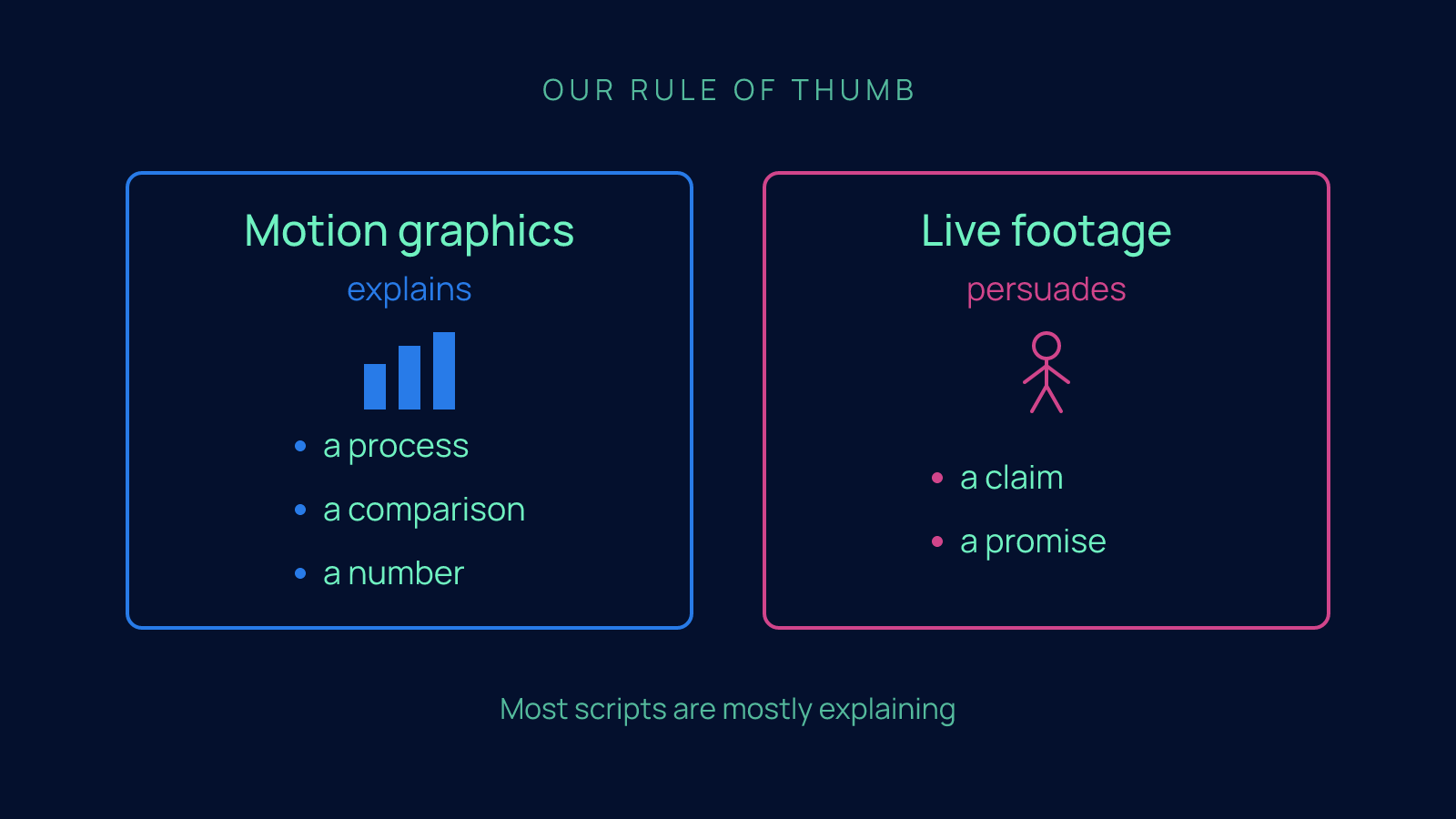
Our rule of thumb: motion graphics for anything that explains (a process, a comparison, a number), live footage for anything that persuades (a claim, a promise, a moment where the prospect needs to see that a person stands behind this). Most scripts are mostly explaining, which is why most of our video is motion graphics and only a little of it is me on camera.
Write this plan down. A scene list with three columns (scene, visual, format) is enough.
Step 6: Run it through your workflow
This is where the time savings live, and it is the part most founders have not built yet.
Our workflow is a repeatable set of instructions that carries our brand style guide (colors, typeface, tone) and our motion-graphic style guides (how text enters, how transitions move, what a diagram looks like in our world). The script and the scene plan go in. The model produces animation that already looks like Edge8, without anyone restating the rules each time.
Build this once. The first video takes a while, because you are writing the rules as you go. The tenth takes an afternoon.
If you do not have a brand style guide written down in plain language, that is your real first task, and it will pay off far beyond video. Every AI tool you adopt from here on will ask you the same question: what does your company look and sound like? Answer it once, in writing.
Step 7: Add a voice
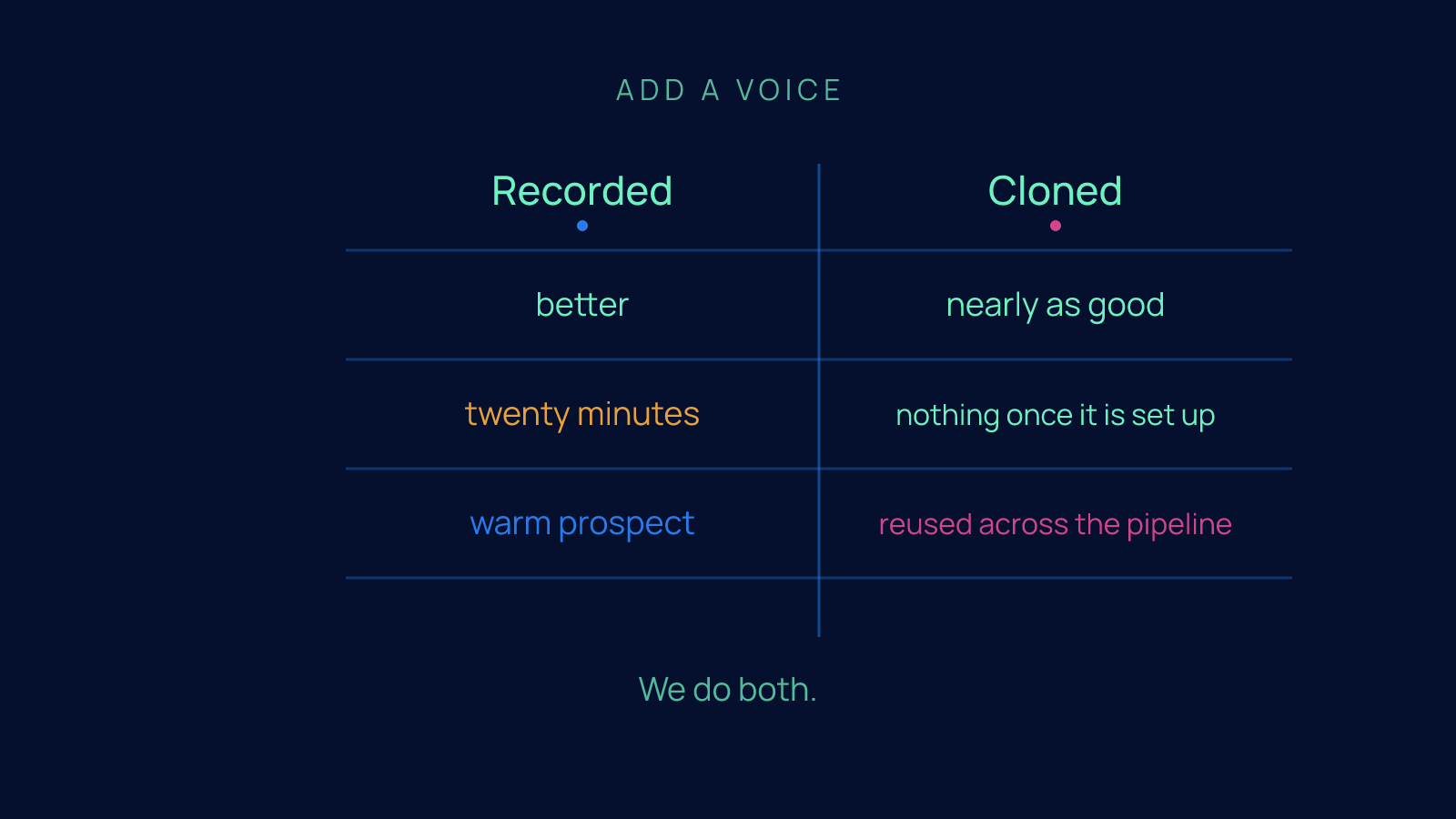
Two options. Record the voiceover yourself, or use a cloned voice (a model trained on recordings of you, so it can read any script in your voice).
We do both. Recorded is better and costs you twenty minutes. Cloned is nearly as good and costs you nothing once it is set up. For a warm prospect who has already heard you on a call, recorded wins; they will notice the difference. For an explainer that will be reused across the pipeline, cloned is fine.
Step 8: Generate and ship
Render the video. Watch it once at phone size with the sound off, because that is how half your audience will see it. Fix what is unreadable. Ship it.
Do not polish past this point. The next video will be better because you made this one, and the prospect waiting on it does not care about the transition on scene four.
The catch
AI video on its own is average. Ours is never as good as when our motion designer directs it. AI amplifies a professional marketer or video person; it doesn't replace one.
Here is the part I want you to hear clearly, because it is the part the AI video hype leaves out.
AI video on its own is average.
Ours is never as good as when our motion designer directs it. Same model, same workflow, same script. When a professional who understands pacing and visual hierarchy is making the calls, the output is noticeably better than when it runs unattended.
AI amplifies a professional marketer or video person. It does not replace one.
I say this as someone who runs most of our own video through a model. The lesson is the one we see in every AI deployment at every client: the technology multiplies whoever is holding it. Hand it to someone with taste and judgment and you get a lot more of their taste and judgment. Hand it to nobody and you get the average of the internet, animated.
So the honest version of the promise is this: you will not need a film crew and a week. You will need a script you are proud of, a workflow you built once, and someone with a good eye to direct it. That someone can be fractional. It cannot be nobody.
The whole process on one napkin
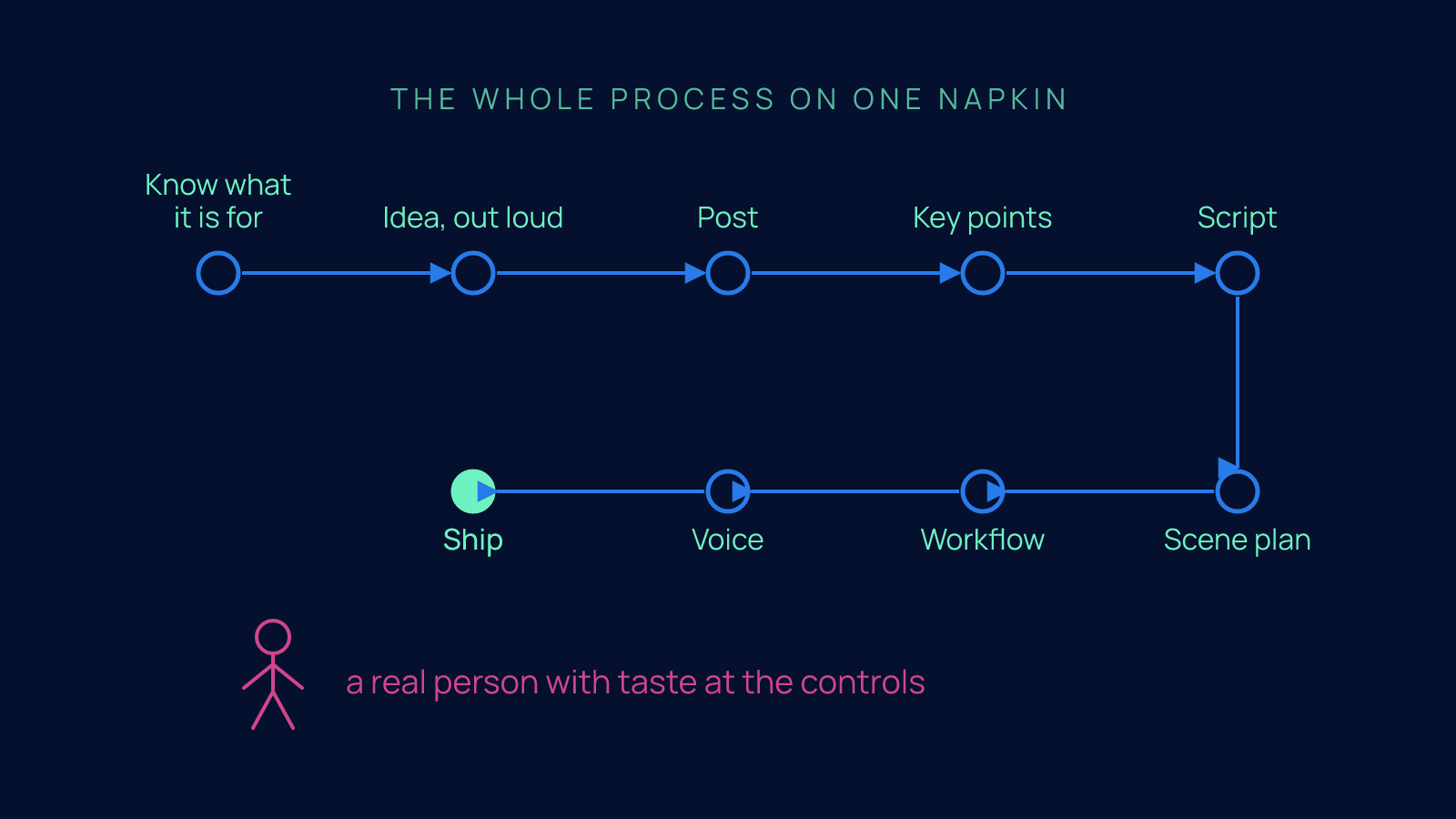
Know what it is for. Idea, out loud. Post. Key points. Script. Scene plan. Workflow. Voice. Ship. And a real person with taste at the controls.
That is it. No studio, no week lost, no eleven takes.
Next step
If you are one of the people we have been talking to and you want to see what this looks like in practice, reply and I will send you the video we made from this exact post, built with this exact process.
And if the catch is the part that stuck, reply and tell me who in your company would be the one holding the controls. That is a better first question than which tool to buy, and it is the one I would rather answer with you.
FAQ
How do I make short-form video for my company with AI without losing my week to filming?
Run an eight-step process where the camera is optional: decide what the video is for, talk the idea through out loud, write the post first, pull out the three to five key points, write the script, plan the scenes, run it through a workflow that carries your brand style guide, add a voice, then render and ship. Most of the video can be motion graphics (animated text, shapes and diagrams with no camera), generated by a model from your script and style guide. The old way cost a Tuesday, a borrowed ring light and eleven takes of a sentence you could have typed in four seconds; the new way costs a script you are proud of and a workflow you build once.
Should I write the script before making an AI video, or just start generating?
Write the post first, then the script, before you touch anything video-related, because the script is the video and no model fixes a flabby one afterward. Read the post back and list the three to five points the video has to hit, then write the script the way you talk and read it out loud with a timer running. The test is simple: the one thing a prospect should understand after sixty seconds has to fit in one sentence, or no amount of animation will say it for you.
Is AI-generated video good enough to use on its own for my business?
No. AI video on its own is average, and the same model, workflow and script produce noticeably better output when a professional who understands pacing and visual hierarchy directs it. The workflow does carry the time savings: the first video takes a while because you are writing the style rules as you go, but the tenth takes an afternoon. AI amplifies a marketer or video person with taste, it does not replace one, and that person can be fractional but cannot be nobody.
Should I record my own voiceover or use a cloned voice for company videos?
Use both, depending on who is watching. A recorded voiceover is better and costs you about twenty minutes, while a cloned voice (a model trained on recordings of you that can read any script in your voice) is nearly as good and costs nothing once it is set up. For a warm prospect who has already heard you on a call, record it yourself, because they will notice the difference; for an explainer reused across the pipeline, cloned is fine.
How do I decide what a company video is actually for before I make it?
Decide the purpose before step one, because it changes every decision after it. With about 50 leads already in the pipeline, the videos in this process are not for lead generation or going viral; they exist to simplify the message for warm prospects, so a founder can forward a short clip to a cofounder or board member without scheduling another meeting. That means optimizing for clarity and forwardability rather than a hook in the first second, while a video built for cold reach would be shorter, sharper and heavier on the hook.