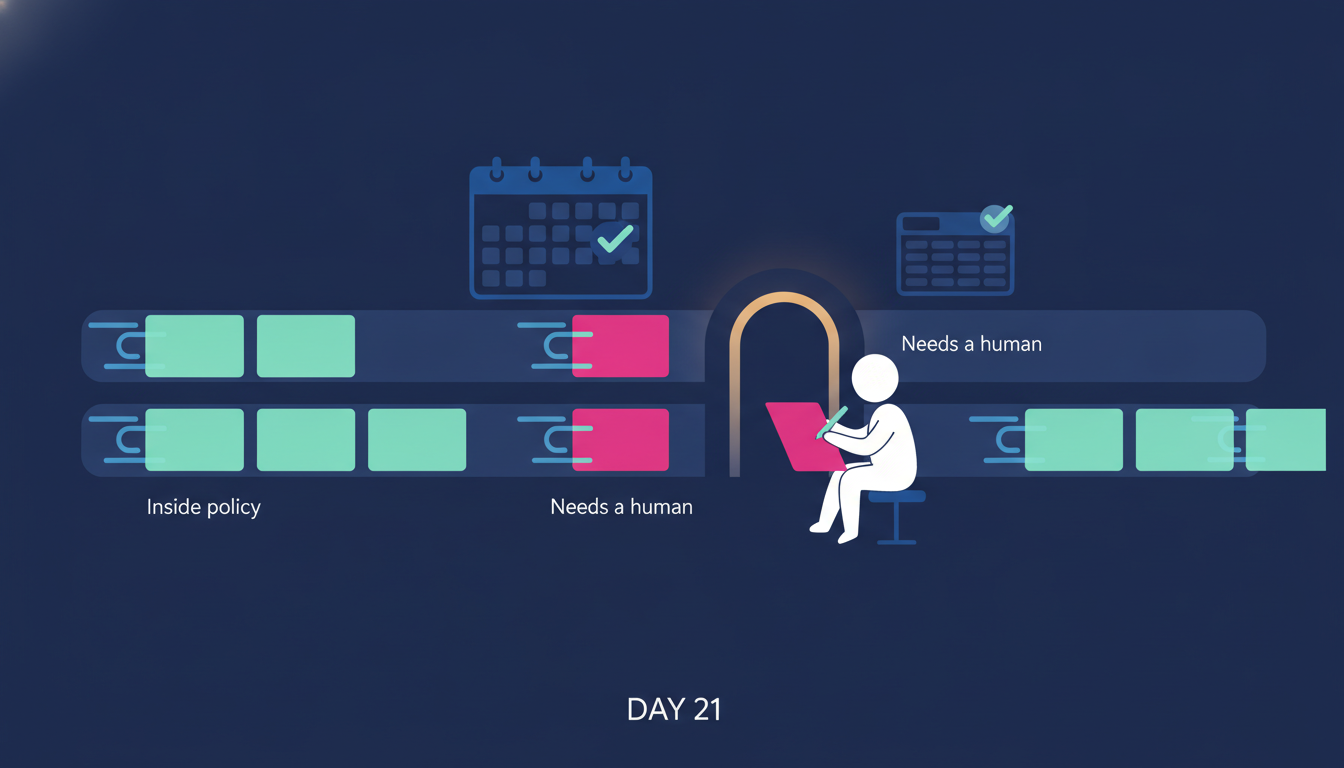
Ask one of your managers where last week went. Watch the pause.
They cannot tell you. Not because they were lazy, and not only because they were in meetings. The week went to approvals. A leave request from someone on the team. A laptop for the person who starts Monday. A vendor invoice forwarded from finance with a question mark and nothing else. Someone asking whether they can expense the thing they already bought.
None of it was hard. All of it was theirs. There was nowhere else for it to go.
That is the busywork tax. This post is about who pays it, why it exists, and the two-part fix we run inside Edge8's own Company OS, the operating system we built to run our own company and are showing, screen by screen, across the 30-day 8 Edges season. Day 20 named operations the honest cost center and set one goal: make it small. Day 21 is the first of the four fixes Day 20 promised, and it goes after the busywork that eats a manager's week.
The busywork tax is paid by your most expensive people
That is the busywork tax, the most expensive people pay it, and they pay it in the hours they were hired for.
Approvals do not land on the cheapest person in the building. They land on the person with the authority to say yes. That is a manager, a head of department, often the founder.
So the people you brought in for judgment, for coaching, for holding a team together, spend their hours doing something a vending machine could do: checking that a request matches a rule and pressing a button. The cost is not the moment it takes to press the button. The cost is the interruption, the switch of attention, the request that sat in an inbox while the person who filed it waited, and the manager's real job, managing people, pushed to whatever time was left.
The tax is paid in the hours they were brought in for. That is what makes it the most expensive line in operations, and it never shows up on a budget.
Why the inbox became the system
Nobody designs it this way. When the company was small, the founder approved everything, and that was fine. Then there were managers, and they approved everything for their teams, and that was fine too. The policy, if there was one, lived in the manager's head. The request went to the manager because the manager was the only place the policy existed.
So the inbox became the system. Every request, however routine, needs a human to open it, remember the rule, apply the rule, reply, and then, if anyone bothers, update the balance, the calendar or the spreadsheet of who has which laptop. The last step is the one that gets skipped, which is why the leave balances are wrong and the laptop register is a guess.
The fix has two parts, and you need both
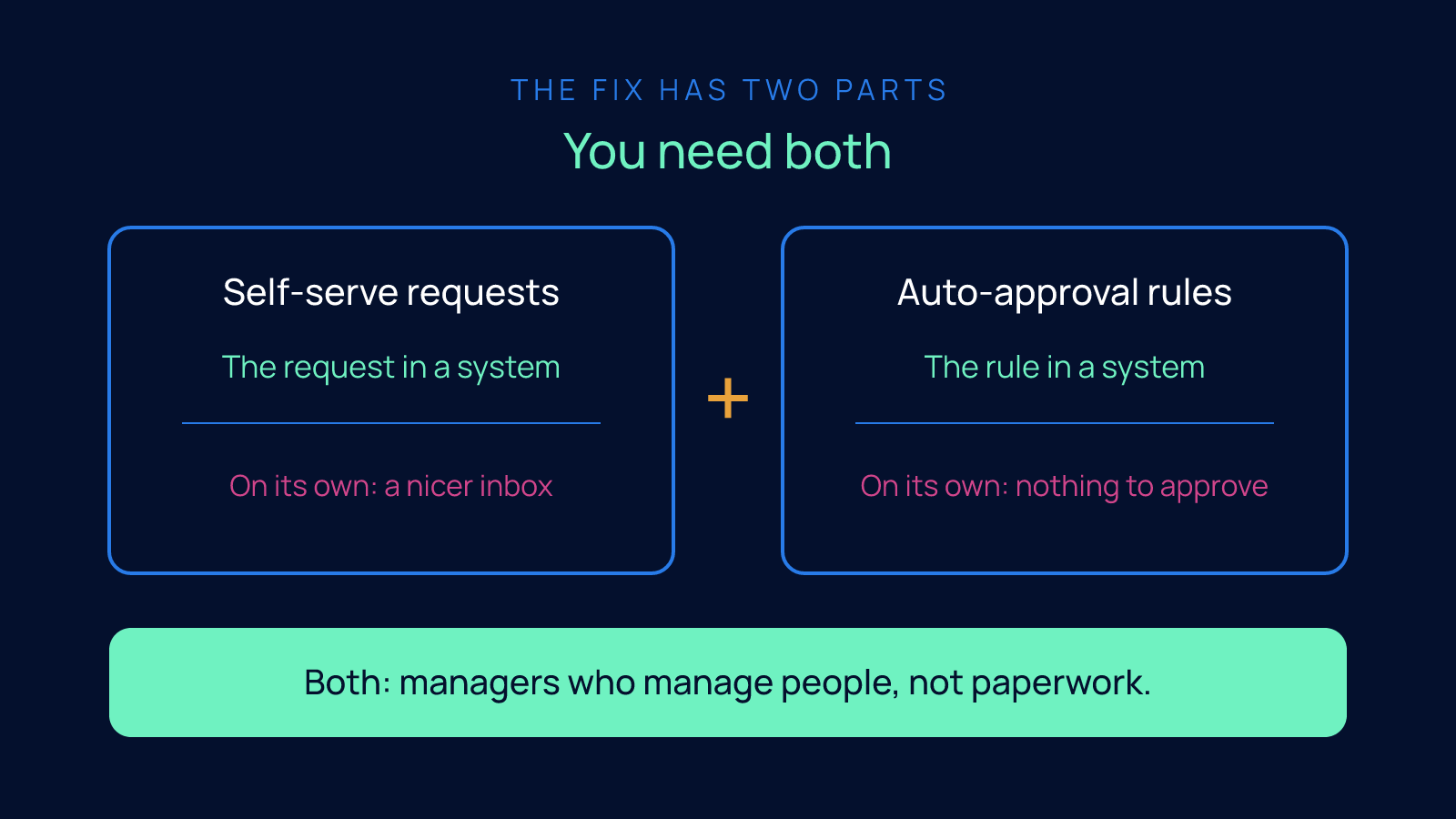
The way out is a framework with two halves. I am going to insist on both, because companies keep trying one without the other and wondering why nothing changed.
Part one: self-serve requests
Self-serve means the person who wants something files it themselves, into a system, not into a manager's inbox.
That sounds small. It is not. The moment a request has a form and a place to go, it stops being a message. It has fields: a type, dates, a requester. It can be seen by everyone who needs to see it without anyone forwarding anything. The person who filed it can watch it move instead of asking whether anyone saw their email.
But self-serve on its own just moves the pile. The manager still opens every request. It is a tidier pile. It is still their pile.
Part two: auto-approval rules
Auto-approval means the policy is written down once, in a form the system can read, so a request inside policy approves itself the moment it arrives. Only the exceptions reach a human.
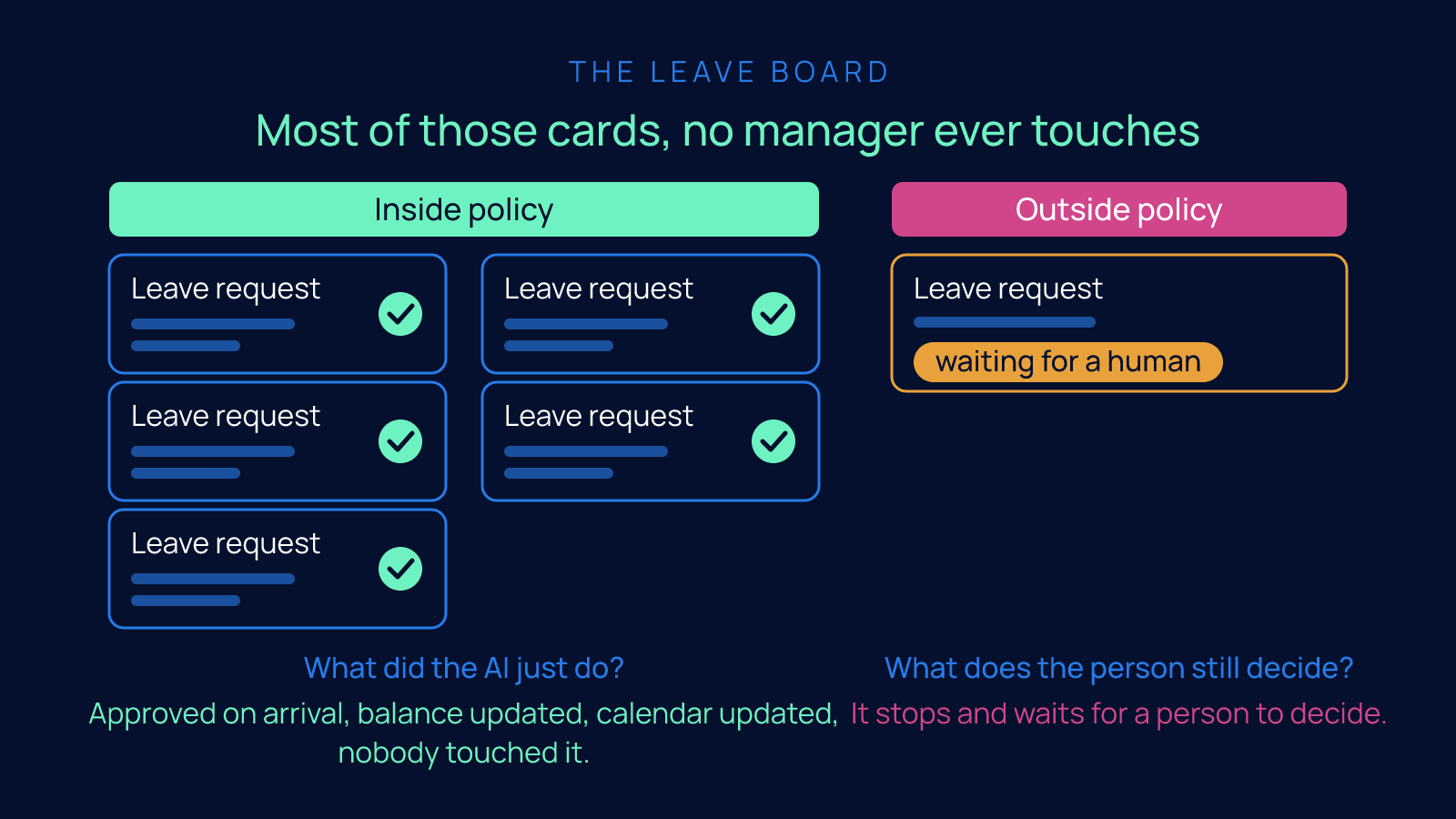
Inside policy: approved on arrival, balance updated, calendar updated, nobody touched it. Outside policy: it stops and waits for a person to decide.
This is the half that actually gives the manager their week back. It is also the half that forces the real work, which is the next section.
Put the two together and you see why you cannot skip either. Self-serve without auto-approval is a nicer inbox. Auto-approval without self-serve has nothing to approve, because the requests are still arriving as chat messages and hallway conversations. The request in a system and the rule in a system. Both.
The honest test of a policy
The honest test of a policy follows: if a rule cannot be written clearly enough for software to apply it, it was never a rule, it was a mood.
Here is where most companies find out something uncomfortable about themselves.
To write an auto-approval rule, you have to state the policy clearly enough that software can apply it. Not "we are flexible about leave." Not "ask your manager." Something like: if the person has the balance, and the dates are not blocked, and the request was filed with enough notice, approve it.
Try to write your leave policy that way and see what happens. You will find a line in the handbook that nobody follows. You will find a rule that different managers apply differently. You will find a policy that is really just whatever the manager felt like that week.
So here is the test, and I mean it as a test, not a slogan: if a rule cannot be written clearly enough for software to apply it, it was never a rule. It was a mood.
A mood is not a policy. A mood is why one person got the Friday off and another did not. A mood is why one laptop went through the same day and another sat in a queue. A mood is why approvals feel political, and why your managers get the same question asked again and again, because nobody can predict the answer.
Writing the rules down is the real work. It is a founder's job, or a leadership team's job, and it takes honest conversations about what you actually allow. I will say this plainly because people get it backwards: the software is the easy part. The thinking is the part you cannot buy.
The leave board, live inside Edge8
Here is what this looks like in practice. The Day 21 film walks through it on screen, and the board I am describing is the one we run our own company on. It is live in Edge8's Company OS. Not a mockup, not a demo build.
Every leave request anyone on the team files lands in one place: the leave board. Each request is a card. You can see who, what type, which dates, and where it is in the process.
Here is what matters: most of those cards, no manager ever touches. The request was inside policy. It was approved the moment it arrived. The person's balance went down. The team calendar got the dates. Nobody filed anything, because the filing already happened.
And beside those cards sits a different kind. A request that fell outside policy. Maybe it clashes with someone else on the same team. Maybe the balance is short. Maybe the notice was too short. That card is waiting for a human, and it is clearly marked as waiting, so the manager sees only the ones that need a decision.
So, the two questions I ask of every AI claim, including my own:
What did the AI just do? It applied the written policy. It approved what was inside it. It updated the balance and the calendar. It did the filing.
What does the person still decide? The exceptions. The request outside policy. The clash. The judgment call.
That split is the whole design. The AI does not decide whether your leave policy is generous or strict. You decided that when you wrote it down. The AI applies it, every time, the same way, and gets out of the way. The manager shows up for the cases where a human actually adds something.
Same pattern: the equipment register
Leave was the first one we built because it was the loudest. The same pattern runs on the equipment register, also live in our Company OS.
A new team member needs a laptop. Someone needs a monitor. The request is filed, into the system, by the person who needs it or the person onboarding them. If it is a standard item inside policy, it moves. The register updates. The register always knows who has what, because the request and the record are the same thing. Nobody maintains a spreadsheet, because there is no spreadsheet. The spreadsheet was the problem.
Anything unusual, something not on the standard list or outside what the policy allows, stops and waits for a person. Same split. The AI applies the rule and keeps the register. The person decides the exception.
And work requests from clients
The third place we run this is work requests from clients. A client needs something from us. It gets filed once, into the system, and then it moves across a board where everyone can see it. Nobody is forwarding an email asking who is on this. The request has a place to live and a status anyone can read.
I am describing that one in words rather than showing it on screen, because the Day 21 film shows leave and equipment. But the pattern is identical, and that is the point of a pattern. Once you have the request in a system and the rule in a system, you can run it on anything that used to be an approval in somebody's inbox.
The requests did not go away. The manager's inbox did.
The requests still happen; they just stopped needing the managers. Managers who manage people, not paperwork, is streamlined operations.
I want to be careful about what I am claiming here, because this is where vendors oversell.
The requests still happen. People still take leave. New team members still need laptops. Clients still ask for things. None of that stopped, and nobody is pretending it did.
What stopped is the requests needing the managers. The routine ones, the ones inside policy, approve themselves, file themselves and update what needs updating. The managers see only the exceptions, which is the only part of the job that was ever worth a manager's attention.
That is what streamlined operations actually means. Not fewer requests. Not a faster inbox. Managers who manage people, not paperwork.
Where to start, this week
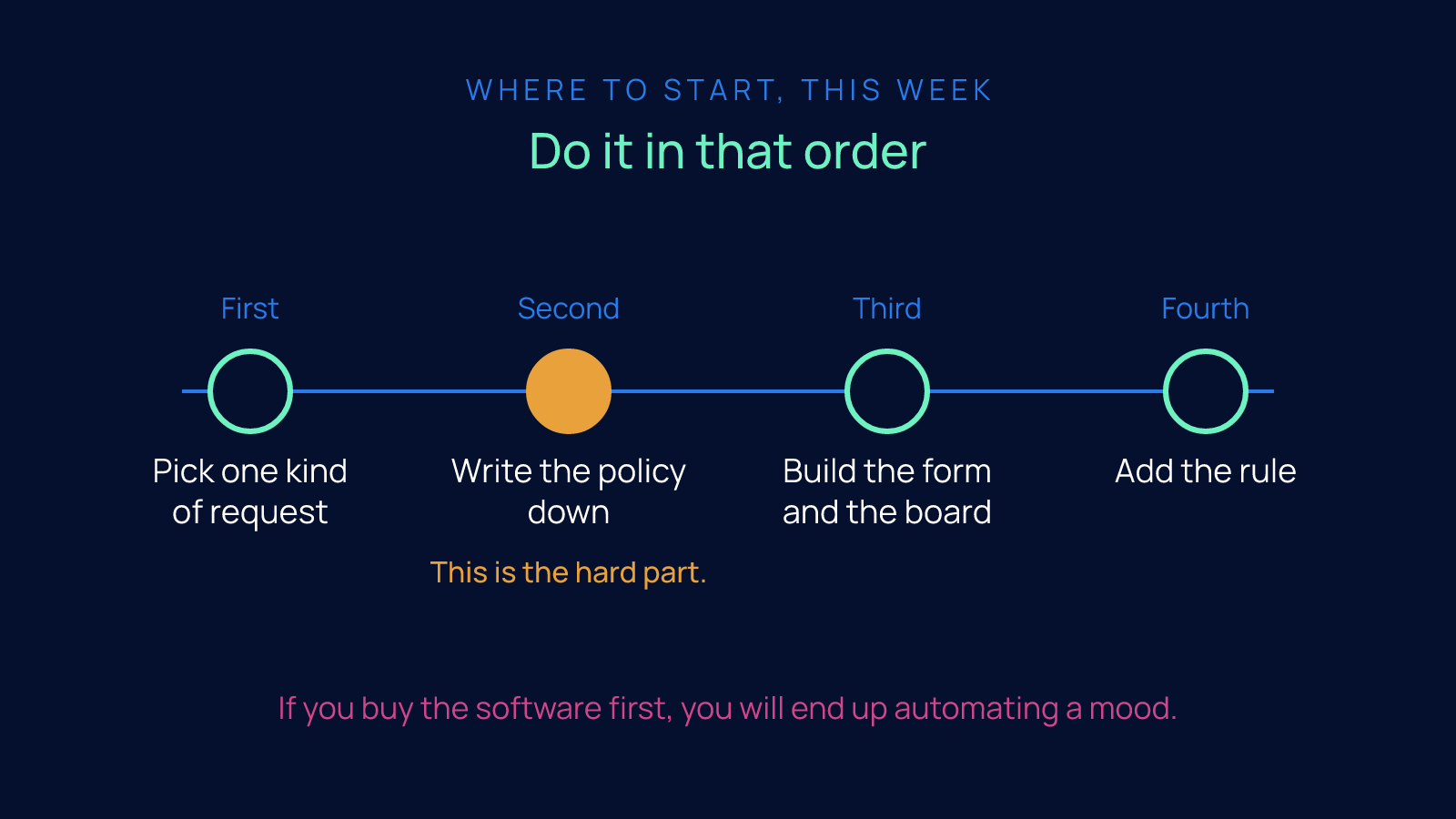
If you want to run this in your own company, here is the order, and it is not the order most people choose.
First, pick one kind of request. Leave is a good first one because everyone files it and everyone has an opinion about it.
Second, write the policy down in plain sentences that a piece of software could follow. This is the hard part. Expect disagreement. Expect to discover you did not have a policy. Resolve it. That is leadership work, and it is overdue.
Third, build the form and the board so the request has somewhere to go that is not an inbox.
Fourth, add the rule, so inside policy approves itself and outside policy waits for a human.
Do it in that order. If you buy the software first, you will end up automating a mood.
Next step
Watch the Day 21 film and see the leave board and the equipment register running inside Edge8's own Company OS, with an auto-approved request sitting beside one that is waiting for a human.
Then reply and tell me which approvals are eating your managers' week. We will show you how the board would run for you, and we will be honest about which of your rules are rules and which are moods.
Day 22 takes the next operations fix: the books that are always three weeks old.
FAQ
How do I stop approvals from eating my managers' week when every leave request, laptop order and vendor invoice still has nowhere to go but their inbox?
The fix has two parts and you need both: self-serve requests, where the person who wants something files it into a system instead of a manager's inbox, and auto-approval rules, where the policy is written down once so any request inside policy approves itself the moment it arrives. Only the exceptions reach a human, so the manager sees a handful of cards that need a decision instead of a full inbox. Edge8 runs this on its own leave board and equipment register, shown on Day 21 of the 30-day 8 Edges season, the first of the four operations fixes Day 20 promised.
Why does moving requests into a form or ticketing system not actually give my managers their time back?
Because self-serve is only one of the two halves of the fix, and on its own it just moves the pile. The request now has fields and a place to go, but the manager still opens every single one; it is a tidier pile, still their pile. The second half, auto-approval rules, is what removes routine requests from the manager entirely, and companies that try one half without the other keep wondering why nothing changed.
How do I know if my leave policy is a real policy or just whatever each manager feels like that week?
Try to write it as a rule that software could apply: if the person has the balance, the dates are not blocked and the request was filed with enough notice, approve it. If a rule cannot be written clearly enough for software to follow, it was never a rule, it was a mood, and a mood is why one person got the Friday off and another did not. The policy has to be written down once, in a form a system can read, and that writing is leadership work most companies discover is overdue.
What should AI handle in leave and equipment approvals, and what should my managers still decide?
Ask two questions of every claim: what did the AI just do, and what does the person still decide. On Edge8's leave board the AI applied the written policy, approved what was inside it, updated the leave balance and the team calendar, and did the filing, so most cards no manager ever touches. The person decides the exceptions: a request outside policy, a clash with someone on the same team, a short balance or short notice, the judgment call. The same split runs on the equipment register, where the AI applies the rule and keeps the register current and a human decides anything not on the standard list.
What order should I follow to automate routine approvals in my company without making things worse?
Follow four steps in this order: pick one kind of request (leave is a good first one because everyone files it and everyone has an opinion), write the policy in plain sentences software could follow, build the form and the board so the request has somewhere to go that is not an inbox, then add the rule so inside policy approves itself and outside policy waits for a human. Expect disagreement at step two, and expect to discover you did not have a policy. If you buy the software first, you end up automating a mood.